Foxit PhantomPDF to Foxit PDF Editor - Upgrade
-
The EoL version of Foxit PhantomPDF can be upgraded using the Custom Software feature in VulnDetect - Corporate:
https://corporate.vulndetect.com/#/deployment/custom-create-jobTo upgrade Foxit PhantomPDF do the following:
- Click Create New Custom Deployment Configuration
- Enter a title e.g. "Foxit PDF Editor upgrade of PhantomPDF"
- Select the MSI installer: FoxitPDFEditor1122_L10N_Setup.msi
- Enter Installer Arguments: /qn
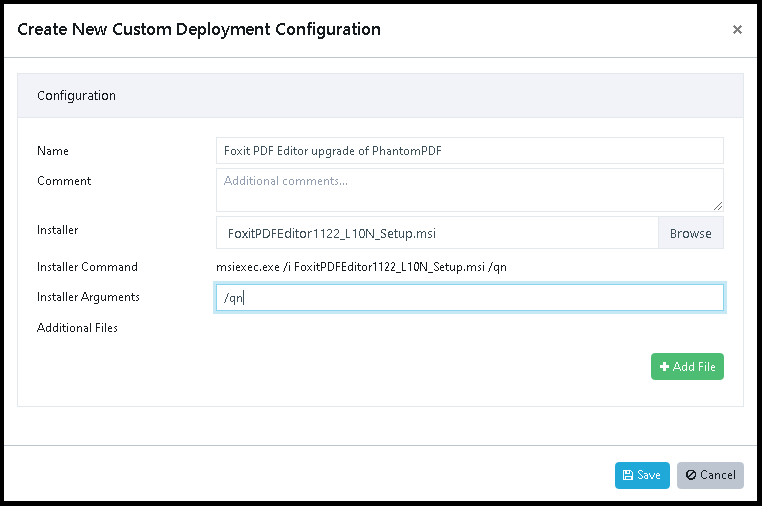
Optionally configure the installation using an MST:
- Enter Installer Arguments: /qn TRANSFORMS="mycustom.mst"
- Select "+Add file"
- Select the MST file: mycustom.mst
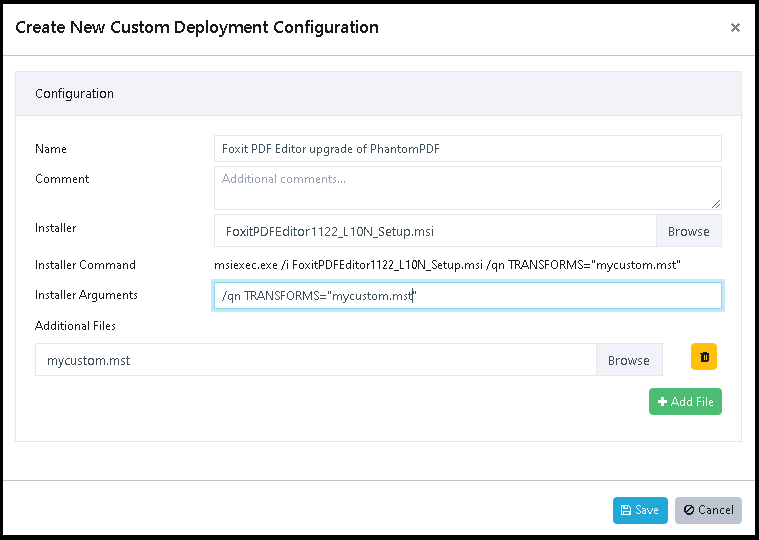
And then click "Save".
The dialogue will now upload the files to the VulnDetect backend.
After saving the Job, you can now select to deploy it to groups or hosts (with the old PhantomPDF).
Remember to inspect the host or group, if you want the job to run right away, else it'll apply after the next scheduled inspection.
After the Job is "Completed" on a host, VulnDetect will automatically conduct a new inspection and update the results for each host:
https://corporate.vulndetect.com/#/deployment/activityAnd you should be able to find the updated results on the hosts or applications page moments later.
-
 R rnz referenced this topic on
-
T Tom referenced this topic on
Hello! It looks like you're interested in this conversation, but you don't have an account yet.
Getting fed up of having to scroll through the same posts each visit? When you register for an account, you'll always come back to exactly where you were before, and choose to be notified of new replies (either via email, or push notification). You'll also be able to save bookmarks and upvote posts to show your appreciation to other community members.
With your input, this post could be even better 💗
Register Login