vulndetect newcomer
-
Greetings. I am a newcomer to VulnDetect. I am a refugee from Sumo. I posted here a few days ago but for whatever reason it was rejected. I have no idea why. Been looking for a tutorial or guide but have not found one. I hope this post gets some results.
I have 3 Windows machines. I installed/ran secteerSetup.exe 3.2 on each one using the same credentials on all three. So far, so good. Whan, I open https://vulndetect.com/#/applications and log in I get a long list of software titles.
How do I freshen the list? I see "Inspect This Computer" and get "Inspection Pending" Specifically, how long does/could it take to get a fresh list ,,, assuming it was what I needed to do.
Lastly, .... if I simultaneously open the same site on another machine, same log in/pw, config lists the same thing on both machines ... same IP, same machine name, I think any of the 3 machines are showing the same list/machine. It's clear that I am doing something wrong.
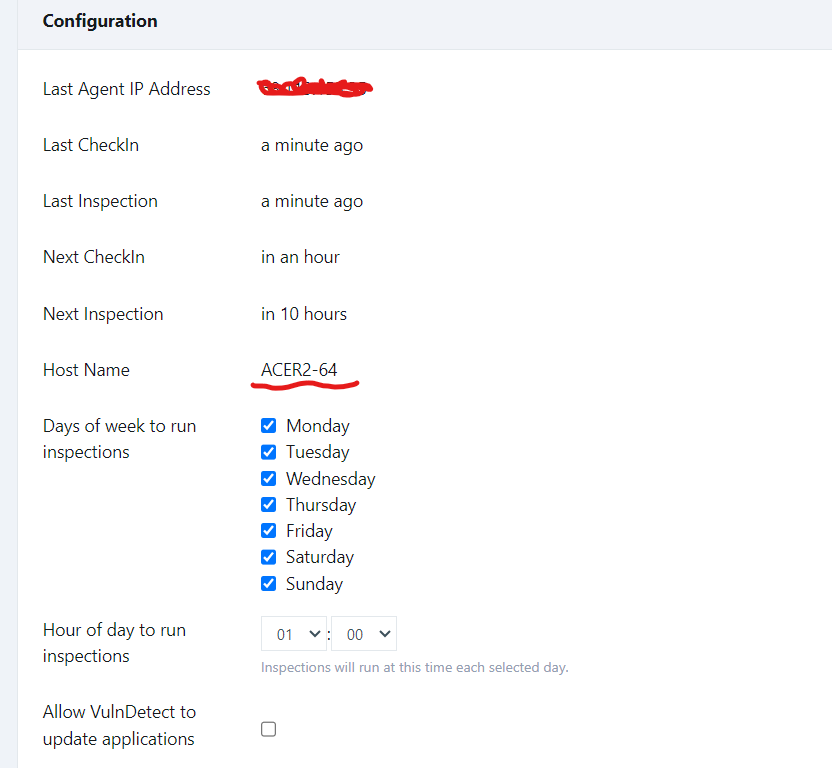
So, I am flying blind. Don't know if what I am doing is right or wrong and would appreciate any help. Thank you in advance.
-
@WacoJohn Welcome to VulnDetect.
The Personal edition of VulnDetect only supports one Agent (installation / PC) per account (email).
I think this may be the reason for the confusion.
If you want to control 3 PC's, then I can give you a "Corporate" account, however, it is intended for a larger number of PC's than 3, so it may also not fit super well.
Our goal is to merge the Personal UI and the Corporate UI, so we get a more user friendly edition of the Corporate. However, I don't have any ETA on that project.
-
@WacoJohn With regards to the "rejection", then I am deeply sorry if that happened. We have received an excessive amount of SCAM posts recently, so our purge might have been a tad excessive.
We did change the way we approve profiles instead, as we have thousands of "ghost" profiles.
To anyone else who gets rejected or "not-approved", please do not hesitate to contact us by other means, and we'll try to find you in the pile of fake profiles and SCAM posts and approve it.
-
Welcome! This is the first time I've posted. I've been using VulDetect since it was announced after the demise of Secunia PSI. This is the first time I've felt I had a constructive comment to make.
When I finally realized all my accounts were showing just the profile for the first machine I installed on, I combed through and found that each installation needed a separate email address. Since Apple, Comcast and others want to give me unique email addresses, I had enough to make separate accounts for each installation.
I do like the idea of a corporate style account and hope I can change over to that once everything is worked out.
Hello! It looks like you're interested in this conversation, but you don't have an account yet.
Getting fed up of having to scroll through the same posts each visit? When you register for an account, you'll always come back to exactly where you were before, and choose to be notified of new replies (either via email, or push notification). You'll also be able to save bookmarks and upvote posts to show your appreciation to other community members.
With your input, this post could be even better 💗
Register Login