Visual Studio removal (of old versions)
-
Removal of (older) Visual Studio installations is possible using the Custom Software feature.
Select the right "bootstrapper" for your use case / license (new ones can remove older installations):
All you need to remove a given installation is to run it with these parameters:
uninstall --quiet --wait --installPath="C:\Program Files (x86)\Microsoft Visual Studio\2017\Community". This will automatically remove the installation in the mentioned folder.It is important to pay attention to the path, even an extra trailing
\will cause the operation to fail.You also need to consider if the old installation is 32-bit (x86) or 64-bit.
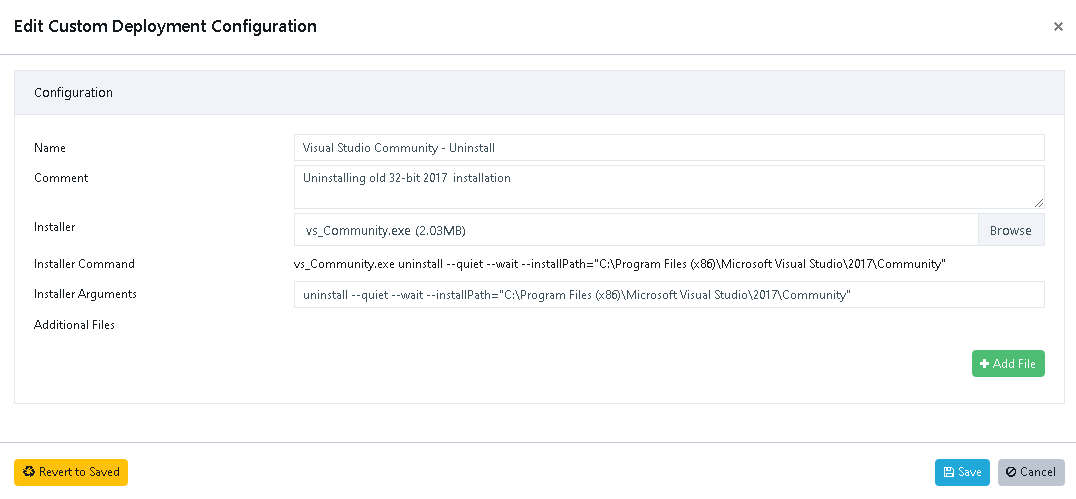
If you supply the wrong path, no harm should happen, the installer just fails to remove Visual Studio.
If you don't supply the "installPath" then it will remove all Visual Studio installations.
Hello! It looks like you're interested in this conversation, but you don't have an account yet.
Getting fed up of having to scroll through the same posts each visit? When you register for an account, you'll always come back to exactly where you were before, and choose to be notified of new replies (either via email, or push notification). You'll also be able to save bookmarks and upvote posts to show your appreciation to other community members.
With your input, this post could be even better 💗
Register Login